
JPEG Saver 4
The JPEG Saver 4.x versions were released between 2010 and 2018. Version 4.0 changed the way that transitions worked from using the DirectX 3 DirectDraw functions for page-flipping to using DirectX 9's Direct3D for hardware assisted geometry and pixel shader transitions. Most of the transitions that were available in JPEG Saver 3.x were re-implemented using the new, faster techniques.
Version 4 of JPEG Saver has since been superceded by version 5, though the last 4.x installer files are still available from the downloads page.
4.x Changelog
Version: 4.20 - 27/02/2018
JPEG Saver is now available in 32 or 64 bit versions. The installer has been changed to use Windows MSI files instead of self-executing. The style editor dialog is now resizeable. Added reset button to filters dialog to reload default set of presets.
Version: 4.19.3 - 20/11/2017
JPEG Saver now exits when the Direct3D device is lost. Added elapsed times to process info item formats. Added unfold push transition. Updated all random number code to use more modern functions.
Version: 4.19.2 - 12/07/2017
Fixed crash when using Desktop or Desktop Pile backgrounds. Fixed name and enabled state not being added with new items. Added white out and colour fade transitions.
Version 4.19.1 - 28/06/2017
Fixed main image filename being forgotten, causing interactive options to misbehave. Fixed right-aligned DirectWrite text being cropped at right.
Version 4.19 - 17/05/2017
Rewritten drawing code to use Direct2D and DirectWrite, falling back to using GDI when unavailable or disabled using new debug dialog.
Version 4.18.2 - 15/04/2017
Fixed crash when attempting to use random item positions.
Version 4.18.1 - 10/02/2017
Fixed crash when loading some Windows tags / keywords from images.
Version 4.18 - 16/11/2016
Added filtering by tag (EXIF and IPTC keywords). Added wave push, funhouse, corner rotate and twist over transitions. Improved folder lock mode navigation. Removed Windows XP support - minimum supported Windows version is now Windows 7.
Version 4.17 - 15/04/2016
Added filter preset support and some built-in presets. Added filtering by age of file. Added checkbox to enable/disable filters. Added count of transitions enabled to main dialog. Made main transitions selection checkbox toggle between all / none / previous selection. Fixed partial crash on some hardware when transitions were given incorrect timing. Fixed crash when using secondary screen as main JPEG Saver screen and no images on primary screen. Fixed random start option for Explorer slideshow mode.
Version 4.16 - 11/03/2016
Fixed red/blue colour swapping on some display hardware. Added Windows Explorer integration for use as slideshow viewer. Improved display of style font details.
Version 4.15 - 17/10/2015
Added image pile background modes. Added folder lock interactive option using the “a” key. Added circle, rings and cross flop transitions.
Version 4.14 - 12/05/2015
Added analog clock item. Added Windows Explorer properties to file info item formats. Added warp spots transition. Added config file version test. Space bar now pauses and resumes in addition to the “p” key. Control key is ignored when not used my JPEG Saver's interactive options. Fixed bug preventing display of some IPTC fields. Fixed bug where background was not being drawn. Improved rating options to make them more robust and provide a better error message.
Version 4.13.1 - 29/10/2014
Added alphanumeric image selection mode. Added image average and image edge average background modes. Tidied up options on folders tab, new folders are now always added in recursive mode.
Version 4.13 - 05/08/2014
Added mirror X, mirror Y and desaturate options to background tab. Made background images centre on main image position. Improved loader thread code to prevent loading images for multiple screens in the wrong order.
Version 4.12 - 14/04/2014
Added favourites support. Added transition speed option. Added shift, intersect, viewpoint, boxes, checker boxes and box turn transitions. Fixed colour management not working. Fixed change timer not restarting after transition aborted. Fixed crash when loading broken PNG images.
Version 4.11.2 - 11/02/2014
Improved list info item. Fixed image loading stopping when same image picked twice in succession. Fixed images being rotated unnecessarily when embedded EXIF thumbnail has orientation data. Fixed config dialog being placed behind other windows after preview. Made file selection modes not pick the same image twice in succession.
Version 4.11.1 - 22/01/2014
Added preview button to dialog. Added shutters transition. Added desktop wallpaper file location to interactive options dialog. Added scanburst option and made metadata scan less aggressive during input.
Version 4.11 - 13/12/2013
Added maximum shape skip. Added sequential mode toggle from screen saver. Added two new transitions. Added F1 help to dialogs. Added width and height filters. Added background metadata scan. Fixed loading config file from non-boot drive. Fixed sub-folders being deleted from database when higher level folder modified.
Version 4.10.1 - 23/10/2013
Added cursor keys only interactive option. Added two new transitions. Added renaming of items. Dialogs now open in centre of screen to avoid taskbar when not at bottom of screen. Re-added skipping of bad images. Fixed corrupt pixels appearing on some hardware.
Version 4.10 - 21/09/2013
Improved multi-monitor support with options dialog. Added EXIF GPS fields to image details item. Added three new transitions. Added checkboxes to folders and items tabs to enable/disable selection. Images are now loaded and scaled in background threads to prevent screen locking up. Improved check for new images. Save desktop wallpaper option now saves multi-monitor images.
Version 4.9.1 - 17/07/2013
Fixed bug where incorrect validation would prevent adding items. Fixed JPEG Saver process not always exiting when quit during a transition.
Version 4.9 - 10/06/2013
Added loading of WebP images. Added “Keep aspect ratio” option for resizing background images. Made clicking on colour swatches open the colour selection dialog. Added alpha support to logo image items. Added four new transitions.
Version 4.8.1 - 04/03/2013
Fixed random crashing during image loading. Fixed crash when deleting last style and items using it. Fixed filter editor not displaying previous value. Added style and piling options to text file item dialog. Added minidump option.
Version 4.8 - 08/02/2013
Split up resizing options to allow scaling larger and smaller images differently. Added option to resize to a size in pixels instead of a percentage of the screen size. Added border edge options. Improved “Desktop”, “Pile” and “Desktop Pile” background modes. Added “Allow piling” option for showing items on piled backgrounds. Improved text handling for IPTC and Exif fields. Fixed several bugs in Exif and IPTC code that could cause crashes.
Version 4.7.1 - 11/01/2013
Added: text file item; resampler class for more scaling options; left, centre and right align options for text items. Fixed pause icon still being shown when unpaused by pressing the next or previous button. Fixed loading of logo files with paths that were previously failing.
Version 4.7 - 19/11/2012
First version compiled with Visual C++ 2010. Improved database error handling and on-screen display. Added shortcut creation and rating images, GIF and TIFF loading.
Version 4.6.1 - 02/08/2012
File associations for the config files, a transition bug fix and some other
config-related fixes. The file extension for config files is now
“.jscfg”.
Version 4.6 - 10/07/2012
More dialog updates, installer bug fix, two new transitions, several new command-line options and some other small improvements.
Version 4.5 - 30/04/2012
Dialog improvements, three new transitions, bug fix in filter groups.
Version 4.4.1 - 16/12/2011
Quick bugfix release - the ‘e’ key action was only working when there was a “Now Playing” item enabled.
Version 4.4 - 15/11/2011
Adds image list filters, the ‘o’ and ‘e’ key actions, and fixes a couple of bugs.
Version 4.3.1 - 21/10/2011
Bug fix - sequential mode would get out of sequence when new files were added to a folder. Also updated the installer to make files install as the right user.
Version 4.3 - 23/08/2011
Added transition preview to dialog, plus another two transitions.
Version 4.2.2 - 15/08/2011
A bugfix release - the image folder background mode was broken, probably since version 4.1, so this version fixes it. I also took the opportunity to add another transition and update the libraries that JPEG Saver uses.
Version 4.2.1 - 24/03/2011
This minor update fixes a small bug in the clock item dialog, adds two new transitions and updates the install directory on 64-bit Windows.
Version 4.2 - 08/03/2011
This version adds: colour management; more transitions; database updates; a few other minor fixes.
Version 4.1 - 23/11/2010
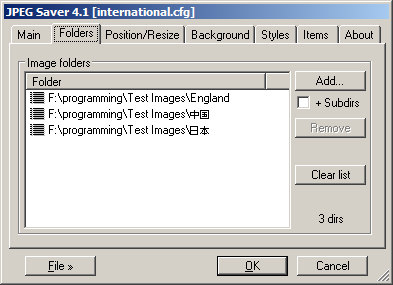
Version 4.1 changes things a bit. Instead of using a cache file to speed up
loading the list of images, the list is stored in an SQLite database. Details of
the last image displayed are also stored in the database, so there is no
jpegsaver.last file either.
As well as this, version 4.1 allows the loading and saving of different config files - the current config file is shown in the dialog title bar. The other big change is that Unicode is supported in the dialog, in the folder and file names, and any text items shown by the screen saver.
Version 4.0.1 - 17/09/2010
A quick bugfix release, with some updated libraries.
Final release of version 4.0 - 30/01/2010
Very little has changed in the final release version, but the installer has been improved to check if the required DirectX libraries are installed already.
Preview release 3a - 20/01/2010
There were a couple of bugs in preview 3, one of which could cause JPEG Saver to crash, so I've replaced it with preview 3a. The “Explode” and “Implode” transitions had a memory allocation problem and the dimmer would cause the non-primary screen to go black under some circumstances.
Preview release 3 - 17/01/2010
Preview release 3 contains these changes from the second preview:
- Fixed dimmer for non-primary monitors;
- Transitions that would have crashed before should now disable themselves instead;
- Added “Spiral” and “Tune in” transitions;
- Split “Zoom fade” transition into old and new types;
- Made several of the transitions smoother;
- Upgraded libpng to 1.4;
- Fixed several small bugs.
Preview release 2 - 05/01/2010
Preview release 2 contains these changes from the first preview:
- Some small bugfixes and improvements;
- Basic multi-monitor support is back;
- The gamma and dimmer controls are now working again (though only on the primary display for now);
- Per-colour component gamma adjustment controls have been added to the gamma/dimmer dialog;
- The main “Navigation” option has been renamed to “Interactive” because many of the keys available now are nothing to do with navigation;
- New gamma adjustment keys have been added to adjust the gamma
while the screen saver is active:
Numpad +Increase gamma Numpad -Decrease gamma Numpad 7Increase red Numpad 8Increase green Numpad 9Increase blue Numpad 1Decrease red Numpad 2Decrease green Numpad 3Decrease blue Numpad .Revert to saved values Numpad *Save current values to config file
This version is out of date!
While it might still work for you, the 4.x branch of JPEG Saver has not been updated since 2018 (and it relies on DirectX 9 which is not installed on recent versions of Windows).
I won't go as far as to say "Don't use it", but just don't be surprised if it doesn't work.